


Household businesses with annual revenue of VND 1 billion or less are required to declare their bank account information or e-wallet identification number to the tax authority. Under the current regulations, the deadline for submitting the notification of bank account information for household businesses with annual revenue under VND 1 billion was 20 April 2026. However, in certain cases prescribed by law, an extension may be granted. Below is a step-by-step guide on how to declare a bank account for household businesses with annual revenue of under VND 1 billion.
1. Household Businesses with Annual Revenue of Under VND 1 Billion Must Notify Their Bank Account Information
- Pursuant to Clause 4, Article 13 of Decree No. 68/2026/ND-CP and Point d, Clause 1, Article 4 of Circular No. 18/2026/TT-BTC:
“Household businesses shall electronically notify the tax authority of all bank accounts opened at payment service providers and all e-wallet identification numbers opened at intermediary payment service providers that are used for production and business activities.”
- Point d, Clause 1, Article 4 of Circular No. 18/2026/TT-BTC further provides:
“Operating household businesses subject to Point b, Clause 4, Article 17 of Decree No. 68/2026/ND-CP shall submit the Notification of Bank Account Number/E-wallet Identification Number using Form No. 01/BK-STK enclosed with this Circular no later than 20 April 2026.”
- This provision refers to Point b, Clause 4, Article 17 of Decree No. 68/2026/ND-CP, as amended by Decree No. 141/2026/ND-CP:
“Household businesses that paid tax under the presumptive tax method or the declaration method during 2025 and have annual revenue of VND 1 billion or less shall notify their 2026 revenue in accordance with regulations.”
- Accordingly, household businesses with annual revenue of VND 1 billion or less were required to notify the tax authority of their bank account information by 20 April 2026. However, operating household businesses with annual revenue of VND 1 billion or less that had not yet submitted their first-quarter 2026 tax return or the required notification were granted an extension until 31 July 2026. In addition, whenever a household business changes its bank account information or e-wallet identification number, it must notify the tax authority in accordance with the Law on Tax Administration.
2. How to Notify Bank Account Information Online via the Public Service Portal
Step 1. Access the Public Service System
Visit the Administrative Procedures Information System at: https://dichvucong.gdt.gov.vn/tthc/homelogin
Step 2. Log In
Household businesses may log in using either:
- their Electronic Tax Account, or
- their VNeID electronic identification account.
Then select “Individual”.
If logging in with an Electronic Tax Account, enter:
- Citizen Identification Number (CCCD);
- Password; and
- CAPTCHA code.
Step 3. Select “Household and Individual Business”
The system will display two modes:
- Official Mode, or
- Trial Mode.
Users may first practice in Trial Mode before submitting officially. Data entered in Trial Mode will not be sent to the tax authority.
Step 4. Select “Notify Bank Account Number/E-wallet Identification Number”
Under the “Tax Declaration” menu, choose “Notify Bank Account Number/E-wallet Identification Number.”
Step 5. Select “Online Declaration”
Click “Continue.”
Step 6. Confirm the Tax Authority
The system will display the tax authority responsible for the business location. Verify the information and click “Continue.”
Step 7. Enter Bank Account Information
In the Household/Individual Business Declaration section, enter the required bank account information and click “Continue.”
Step 8. Complete the Required Fields
Fill in the following information:
- Bank account number;
- Account holder’s name; and
- Bank name.
Select the status “First-time Declaration”, then click “Continue.”
Step 9. Review the Electronic Notification
The system will display the completed notification form for review.
- If any information is incorrect, click “Back” to make corrections.
- If everything is correct, enter the CAPTCHA code and click “Continue.”
Step 10. Verify with OTP
An OTP will be sent to the phone number registered with the tax authority. Enter the OTP to complete the submission.
Note: Only taxpayers who have registered a household business and have been issued a business tax identification number will have access to the Household Business interface.
3. Form for Notifying the Bank Account of a Household Business and Instructions for Completion
- The notification form is Form No. 01/BK-STK, issued together with Circular No. 18/2026/TT-BTC.
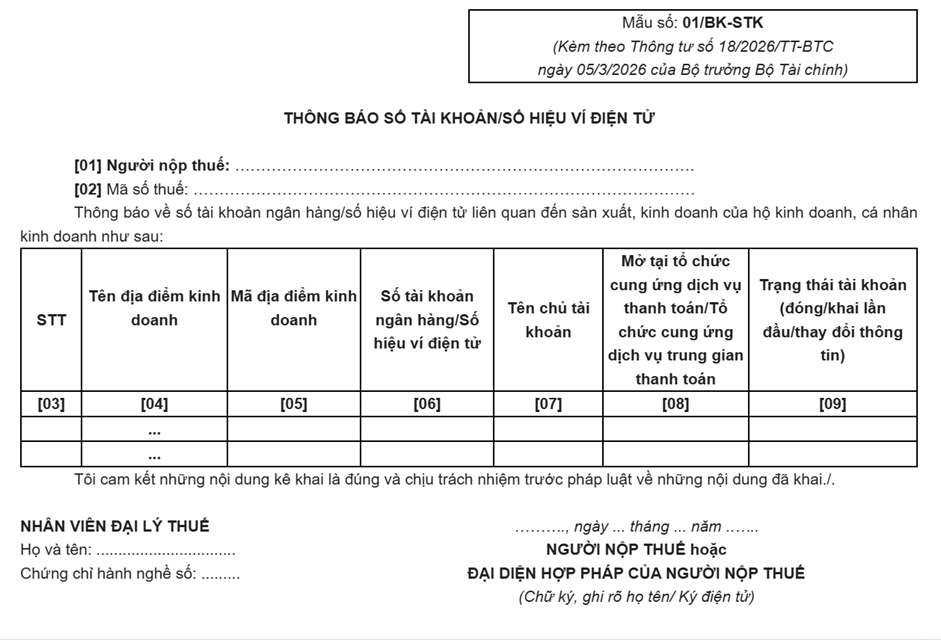
Instructions for Completing Form No. 01/BK-STK
[01] Taxpayer
Enter the full name of the individual business owner or the household business name.
[02] Tax Identification Number (TIN)
Enter the tax identification number of the household business or individual business.
[03] Serial Number (No.)
Enter sequential numbers (1, 2, 3, etc.).
[04] Business Location Name
Enter the name of the business location.
[05] Business Location Code
Enter the business location code if one has been issued by the registration authority. If no separate code exists, this field is generally left blank.
[06] Bank Account Number / E-wallet Identification Number
Enter the correct bank account number or e-wallet identification number.
[07] Account Holder’s Name
Enter the name of the person who owns the bank account or e-wallet.
[08] Payment Service Provider / Intermediary Payment Service Provider
Enter the name of the bank or intermediary payment service provider where the account or e-wallet is opened.
Examples:
- Joint Stock Commercial Bank for Foreign Trade of Vietnam (Vietcombank) – Thu Duc Branch;
- Asia Commercial Bank (ACB);
- MoMo E-wallet.
[09] Account Status (Closed / First-time Declaration / Information Updated)
Specify the status of the account or e-wallet at the time of notification:
- First-time Declaration – for the first notification of the account/e-wallet;
- Information Updated – when changes are made to the account holder’s name, bank, or other related information;
- Closed – when the account or e-wallet is no longer in use.
Notes
- If multiple bank accounts or e-wallets are used for business activities, declare all of them, one per row.
- Only declare bank accounts or e-wallets that are related to production and business activities.
- Ensure that the taxpayer’s name, tax identification number, and business location information are consistent with the existing tax registration records.
DNP VIET NAM LAW FIRM COMPANY LIMITED – DNP VIET NAM LAW FIRM
5th Floor, No. 52 Nguyen Thi Nhung Street, Van Phuc Urban Area, Hiep Binh Ward, Ho Chi Minh City, Vietnam.
Hotline: +84 987 290 273 (LL.M., Lawyer Dinh Van Tuan).
Email: info@dnp-law.com
Website: https://www.dnp-law.com/en/

